Quick Answer
Yes, you can create QR codes for Brawl Stars profiles, club invites, and Discord servers. Use a third-party stats site like brawltime.ninja with your player tag to get a shareable profile URL, then generate a static QR code from that link. The code works permanently and scans straight to the profile on any phone.
I was checking my Search Console data for StackQR and noticed hundreds of people searching for Brawl Stars QR codes every month. I’m not a player myself, but when I saw 85 million registered players constantly sharing profile tags, club invites, and Discord links between phones, streams, and tournament flyers, I was intrigued.
So I researched the ecosystem, tested the most common link types on StackQR, and put together what I found.
The Link-Sharing Problem in Brawl Stars
Brawl Stars is a mobile game, and its community lives across multiple platforms: the game itself, Discord servers, YouTube, Reddit, and in-person events like tournaments and meetups. Players constantly need to share profile links, club invitations, and community URLs.
The friction comes from context switches. A player tag like #L0GLRR89Q is easy enough inside the game, but try sharing that on a stream overlay, a printed tournament flyer, or a Discord banner. Someone watching on a TV or sitting at a table has to manually type that tag into their phone. Long URLs are even worse. Try typing https://brawltime.ninja/profile/L0GLRR89Q on a mobile keyboard without making a mistake.
QR codes eliminate that gap. Scan, tap, done. The profile or invite opens directly on the phone where the game already lives.
What Links Actually Work With QR Codes
Not everything in the Brawl Stars ecosystem has a scannable URL. Here’s what I found when I looked into the different link types.
Player Profiles (Through Stats Sites)
Supercell doesn’t provide direct profile URLs within Brawl Stars itself. Player sharing works through third-party stats sites that use your player tag to display profiles. The main ones I found:
- brawltime.ninja -
brawltime.ninja/profile/YOURTAG(remove the # from your tag) - brawlify.com -
brawlify.com/stats/profile/YOURTAG
These sites show trophies, win rates, brawler progress, and match history. When someone scans a QR code pointing to one of these URLs, they see a full player profile immediately.
I tested this myself. I grabbed a random player tag (#L0GLRR89Q), pasted the brawltime.ninja URL into StackQR, generated the code, and scanned it with my phone.
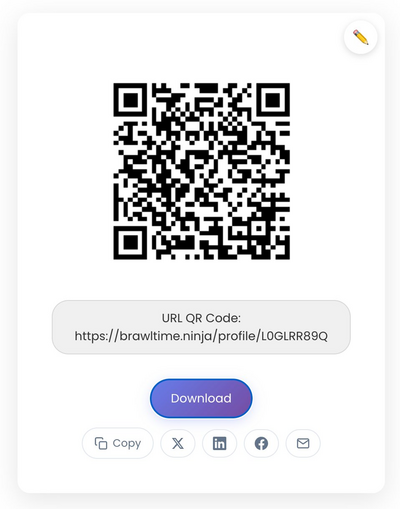
The profile loaded instantly: 24,804 trophies, Rank II, 1,838 3v3 wins, the whole stats page. Took about three seconds from scan to profile.
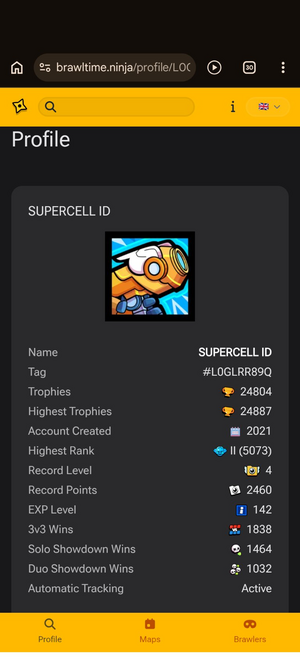
One thing to watch: your player tag has a # at the start, but the URL uses the tag without it. So player tag #L0GLRR89Q becomes brawltime.ninja/profile/L0GLRR89Q in the URL.
Club Invite Links
Brawl Stars clubs can generate invite links that let someone join directly. These work well as QR codes because the link triggers the game’s native invite flow. Scan the code, the game opens, and the join prompt appears.
This is especially useful at local tournaments or gaming meetups where you want people to join your club on the spot without spelling out a club name or tag.
Discord Server Invites
Most active Brawl Stars communities run Discord servers. Discord invite links (discord.gg/INVITE_CODE) are short and stable, making them reliable QR code targets.
The practical use case: a streamer puts a QR code on their stream overlay or end screen. Viewers scan with their phone while watching on a TV or monitor. The Discord invite opens directly, no typing, no searching.
YouTube and Content Creator Links
Creators who make Brawl Stars content often want viewers to subscribe or watch a specific video. A QR code on merchandise, a tournament poster, or an event badge can bridge the gap between physical and digital.
For YouTube specifically, the subscribe-prompt URL format (youtube.com/@YourChannel?sub_confirmation=1) opens YouTube with a subscribe dialog, which is more effective than linking to the channel homepage.
How to Generate a Brawl Stars QR Code
The process is straightforward:
- Get your URL. Copy your profile link from a stats site, your Discord invite, or whatever you want to share
- Open StackQR and paste the URL
- The QR code generates instantly
- Download as PNG for screens or SVG for print
- Test by scanning with your phone before sharing
The important step is testing. I’ve seen QR codes fail because of a typo in the URL, because the stats site changed their URL format, or because the code was printed too small. Scan it yourself first like I tested above.
Where QR Codes Make the Most Sense
Not every situation calls for a QR code. They work best when there’s a gap between where the link lives and where the phone is.
Strong use cases:
- Tournament flyers and registration tables - players are standing around with phones in hand. A QR code on the sign-up sheet or a poster gets instant scans.
- Stream overlays during breaks - viewers watching on a second screen can scan to join your Discord or view your profile. Keep the code visible for at least 10 seconds.
- Merchandise - stickers, t-shirts, or badges with a QR code linking to a YouTube channel or community page. Static codes are perfect here since the link shouldn’t change.
- Social media graphics - a profile card image with an embedded QR code works when shared on platforms where the image displays at full resolution.
Weak use cases:
- Inside the game chat - both people are already on their phones. Just paste the link.
- In a Discord message - the link is already clickable. A QR code adds nothing.
- When the audience doesn’t have a second device - if someone is watching on their phone, they can’t scan a QR code on that same phone.
The test is simple: is scanning faster and easier than typing or tapping? If yes, use a QR code. If not, a regular link works better.
Static Codes Are the Right Fit Here
For gaming links like profiles, Discord invites, and YouTube channels, static QR codes work well. These destinations stay the same. You want the code on your stream overlay or tournament badge to work six months from now without any subscription or account.
Dynamic QR codes let you change the destination after printing, but they require an account, often a paid subscription, and the code stops working if the service shuts down or you stop paying. For gaming content, that complexity adds risk without much benefit.
A static QR code encodes the URL directly. As long as the destination URL exists, the code works. No middleman, no expiration, no account needed.
Common Mistakes I Found During Testing
While researching this article, I ran into a few issues worth flagging:
Forgetting to remove the # from the player tag. Stats site URLs use the tag without the hash symbol. #L0GLRR89Q in-game becomes L0GLRR89Q in the URL. Include the # and the link breaks.
Using URL shorteners. Shortened links can expire, get flagged as spam, or break if the shortening service goes down. For a QR code that needs to last, especially one printed on physical material, use the full destination URL.
Printing too small. At a gaming event, people aren’t standing still studying your poster. The QR code needs to be at least 2cm × 2cm for close-range scanning, larger for anything viewed from a distance. Download as SVG if you plan to print, since vector files scale to any size without losing quality. Test the scan from the distance people will actually be standing.
Skipping the label. A QR code by itself is a mystery box. Add a short label: “Scan to view my profile” or “Scan to join our Discord.” People scan more when they know what they’re getting.
A Note About Privacy
Some QR code generators track every scan, recording location, device type, and time. If privacy matters to you or your community (and for a younger gaming audience, it should), choose a tool that doesn’t collect scan data.
StackQR generates QR codes entirely in your browser. Nothing gets sent to a server, nothing gets tracked. The code is just a direct link to wherever you point it.
Bottom Line
QR codes fit naturally into the Brawl Stars world because the game and its community already live on mobile. Sharing profiles through stats sites, distributing club invites at events, and connecting viewers to Discord all benefit from the scan-and-go simplicity.