We have an SNES Classic for retro gaming that I bought for nostalgia from the 90s. My son had fun with it, though plays Nintendo Switch mainly. But hundreds of people every month still search for “3DS QR codes” on a platform Nintendo discontinued in 2020. That contradiction caught my attention. So I set out to find what’s happening.
Turns out there’s a strong reason the searches keep coming. Nintendo may have moved on, but the 3DS community has not. Custom Pokémon QR codes still get shared in subreddits. Animal Crossing designs from a decade ago still circulate on Discord servers. Tomodachi Life Mii characters still get traded. None of it requires Nintendo’s servers, because QR codes never needed them in the first place.
That makes the 3DS a useful case study in how offline sharing outlives the services built around it.
QR codes on the Nintendo 3DS import game-specific content, share player creations, and link to web pages. They work through individual game scanners, not as general file transfers. Static QR codes are the best choice for archiving since they do not depend on any online service.
What QR Codes Actually Do on the 3DS
The Nintendo 3DS launched when QR codes were common on phones but not yet universal. Nintendo used them as a lightweight way to move small amounts of data between devices without accounts, cables, or online services.
On the 3DS, QR codes generally do one of three things:
- Import game-specific content
- Share small customizations or player-created data
- Link to external web pages
What happens after a scan depends entirely on the game. The system itself does not treat QR codes as files or save data. This catches people off guard because they assume a QR code works like a download or a backup. On the 3DS, it does not.
How Scanning Works
The 3DS has a built-in camera with QR support, accessible two different ways. These behave very differently.
System camera app. Scanning with the system camera just reads the embedded text or URL. If it’s a web address, the 3DS browser opens the page. If it’s plain text, the system displays it. That’s the entire interaction. The system does not install content, unlock features, or store data from a system-level scan.
In-game scanner. Some games include their own QR scanner inside the game menu. When scanned there, the game interprets the data based on rules the developers defined. This is how QR codes actually do useful things: importing characters, unlocking items, sharing designs, registering event content.
A QR code that works inside one game almost never works in another, and scanning a game-specific code with the system camera does nothing useful.
The Types of Codes You’ll Actually Encounter
Unlock and event codes. Some games use QR codes as unlock triggers. The game checks the scanned value, then unlocks content tied to it. Common for limited-time events, promotional items, and cross-game bonuses. Once scanned, the result stores in the save file. You don’t need to scan it again.
Custom content. Several 3DS titles let players create something and export it as a QR code. Character builds, team lineups, room layouts, cosmetic designs. Another player scans the code, and the game reconstructs the content. QR codes work well here because they handle small structured datasets reliably.
Web links. Some QR codes just point to a website, opening in the built-in 3DS browser. This was used for game manuals, support pages, and promotional sites. With many official pages no longer maintained, these codes still scan but often lead to dead pages.
What QR Codes Cannot Do
Full games. A QR code cannot contain a full game, patch, or update. The data capacity is far too small. At best it could point to a download location, and since the eShop shut down in 2023, most of those links no longer resolve.
Save backups. QR codes do not back up save data. Some games export specific save elements as QR codes, but that isn’t the same as preserving the whole file. Treating QR codes as backups means losing progress.
Cross-game transfers. A QR code made for one game does nothing in another unless developers explicitly designed it that way. Random codes found online usually produce errors or no response.
Pokémon and the Long Tail of Active Communities
Pokémon titles are probably the biggest reason 3DS QR code searches still happen. Pokémon Sun and Moon introduced Island Scan, a feature where scanning certain QR codes in-game revealed specific Pokémon on the map. The codes were shared widely during the games’ active period, and they still work today because the data lives inside the image, not on a server.
Animal Crossing: New Leaf had a similar story. Players created custom designs (clothing, flags, paths, patterns) and exported them as QR codes. Years later, people still share QR codes from that game. Scanning one imports the design directly into the player’s in-game sewing machine or design editor.
Tomodachi Life used QR codes for Miis, which some players still trade on Discord and Reddit. Same mechanism, same permanence.
Where QR Codes Fit for Archiving
For players maintaining 3DS collections or documenting their games, QR codes work well as a personal reference system. A QR code placed inside a game case or notebook can link to notes, walkthrough references, or archived guides. Because the code only points to information, not the game itself, it stays useful years after the game was published.
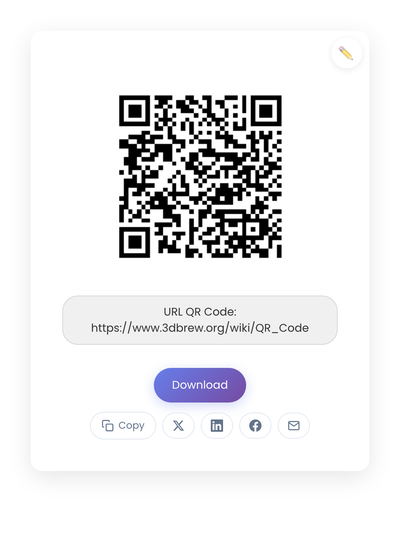
Static QR codes are the right fit here. Dynamic codes route through a third-party server, so if the service shuts down or the subscription lapses, the code stops working. For preserving references tied to a platform Nintendo has already moved on from, that dependency is a real risk. A static code encodes the destination URL directly into the pattern. As long as the destination exists, the code works.
I tested this by generating a QR code on StackQR pointing to 3dbrew.org/wiki/QR_Code (a homebrew wiki that’s been online for years). The code generates instantly and doesn’t need an account or subscription. If I print it inside my SNES Classic box as a reminder of related resources, it keeps working regardless of what happens to any intermediary service.
When Scanning Fails
When a QR code won’t scan on a 3DS, the cause is usually one of four things.
Image quality. Blurry images, heavy compression, or screenshots scaled down too far often fail. Use the original image, avoid resizing, and increase screen brightness when scanning.
Lighting. The 3DS camera struggles in low light. Scan in a well-lit room, avoid glare, and hold the device steady.
Wrong scan mode. Scanning a game-specific code with the system camera does nothing useful. Open the game and use its built-in scanner instead.
Region or version mismatch. Some codes only work with specific editions. Confirm the code matches your game version and region.
The Ethical Line
QR codes are neutral. How they get used matters. Sharing custom designs you created, event content distributed publicly, or game-supported exports generally stays within expected use.
Sharing QR codes that bypass game protections or distribute copyrighted content is a different matter. Even when technically possible, it creates legal risk and harms the communities that rely on legitimate sharing to stay healthy. Sticking to intended game features avoids those problems.
Why They Still Work
The reason QR codes still work for 3DS games years after Nintendo moved on is exactly the reason they work for anything else offline. The data lives inside the image itself, not on a server someone has to keep running. As long as the game can read the code and the image stays readable, sharing keeps working.
That’s a useful principle beyond gaming. Any time a use case requires small amounts of data, scannable storage, and long-term durability, static QR codes solve it cleanly. No account, no subscription, no expiration. Just a pattern that encodes information directly.