Quick Answer
StackQR lets you create a QR code in seconds by typing plain English. Just describe what you need (“wifi CafeNet password latte”), click Generate, and download in PNG, SVG, or WebP. Everything runs in your browser with no account, no tracking, and no cost.
I built StackQR because every other QR code generator I’d tried made me think harder than the task required. The QR code is a simple thing: take a string of text or a URL, encode it into the visual pattern that phones already understand, and let me download the result. Most tools wrap that with dropdowns to navigate, accounts to create, and a paid tier hovering just past the most useful feature. StackQR is the version that strips that all out.
You type what you want in a single sentence. The page generates the code in your browser, in front of you, with no data leaving your device. You download. The whole thing takes less time than reading this paragraph. That’s the entire promise.
How StackQR works under the hood
StackQR generates static QR codes. Every code holds the destination directly inside the pattern, with no redirect service in the middle. That choice has real consequences. The code costs nothing. It works forever. Your data never reaches a server. There’s no subscription that can lapse and break the printed code on someone’s product packaging years later.
Dynamic codes (the kind most commercial generators push) point at a redirect server that forwards scanners to the destination. Useful for marketing campaigns where the destination needs to rotate, but it introduces a vendor in the middle and an ongoing fee. For almost every personal and small-business use, static handles it. Update the page behind the URL when you need to; the printed code keeps pointing at the same URL. (The longer comparison of static and dynamic codes covers the longer comparison.)
The natural-language input was the other design decision. The standard for QR code creation is a form with dropdowns: pick “WiFi” from a list, enter SSID in field 1, password in field 2, security type in field 3. That works. It also feels heavier than the task warrants. StackQR’s input is a single text field where wifi CafeNet password latte produces the WiFi QR code. The parser picks up the type from how you describe it.
Creating your first code
Open stackqr.com. There’s a text box in the middle of the page. No login screen, no welcome flow.
Type what you want in plain English. A few examples:
https://mywebsite.comwifi CoffeeShop password Welcome2026email contact@mybusiness.com subject Inquiryphone +1-555-123-4567sms +1-555-987-6543 message Thanks for visiting- Any block of plain text up to 1,000 characters
The parser figures out the type from the input. If you mention wifi plus a network name and password, you get a WiFi QR code. If you start with email, you get an email code. If you include https:// or a domain, you get a URL code. You don’t need to remember syntax beyond writing the thing the way you’d say it out loud.
Hit Enter or click Generate. The code appears immediately. You can scan it from another phone right then to confirm it works.
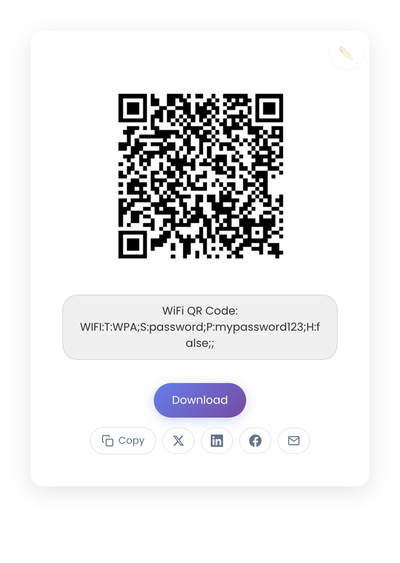
A static QR code generated from the plain-English input “wifi HomeNetwork password mypassword123.” The code is created in the browser; the password never leaves the device.
Downloading and editing
Click the download button on the code and choose a format. The five options cover most needs:
- PNG: best for screens and most web use. Universal compatibility.
- JPEG: smaller file size, fine when storage matters and the code doesn’t need a transparent background.
- WebP: modern format with better compression than PNG. Use it when you’re targeting modern browsers.
- SVG: vector format that scales without quality loss. Use this for anything going to print, from business cards to billboards.
- GIF: universal compatibility for older systems.
Each downloaded file includes a small metadata footprint so you can find the code later by what it encodes, not just by filename.
If you made a typo or need to change something, click the pencil icon on the generated code, edit the input, and the code updates immediately. No need to start over.
For batch generation, type multiple codes’ worth of input separated by and: wifi GuestNet password Welcome2024 and https://mysite.com and email hello@mysite.com. StackQR generates all of them at once and offers a ZIP download with each code as a separate file.
What kinds of codes it supports
StackQR supports the six most common QR code types.
URL codes for any website. Used on business cards, flyers, marketing materials, anywhere you want to point someone at a webpage. The parser adds https:// if you forget it.
Email codes that open a compose window with the recipient, subject, and body pre-filled. Used for customer support, feedback collection, structured inquiries.
Phone codes that open the dialer with the number ready to call. Used for service businesses, support cards, anywhere a phone call is the goal.
WiFi codes that connect a phone to a network automatically when scanned. Used in cafés, salons, waiting rooms, anywhere guests need quick WiFi.
SMS codes that open a text message with the number and message ready. Used for opt-in marketing and short contact paths.
Plain text codes for anything up to 1,000 characters that doesn’t fit the other categories.
If you have a use case the parser doesn’t handle, email features@stackqr.com. Feature requests genuinely shape the roadmap.
Making sure the code scans on the first try
A few small details separate codes that scan reliably from ones that frustrate.
Print at least 2cm × 2cm (about 0.8 inches square) for arm’s-length scanning. Larger if the code lives on a sign that gets scanned from a distance.
Keep the contrast clean. StackQR generates black on white by default because that’s the most reliable for phone cameras across lighting conditions. If you’re placing the code on a colored background in a design tool, make sure the area immediately around the code stays white (the “quiet zone”).
Test the printed result on at least two phones, not just the screen preview. Ink density and paper finish change scan behavior. A code that scans on a desk monitor can struggle on glossy paper under fluorescent light.
Add a short label near the code so people know what they’re scanning. “Scan to pay,” “Scan for menu,” “Scan for WiFi.” Two or three words remove the small hesitation that loses casual scans.
Keyboard shortcuts
For repeat use, a few shortcuts save time:
Cmd/Ctrl + K: focus the input fieldCmd/Ctrl + EnterorEnter: generate the codeCmd/Ctrl + D: download the current codeEscape: dismiss dialogs
How the privacy story actually works
Every QR code on StackQR generates in your browser. The JavaScript that does the encoding runs on your device. The input text, the URL, the WiFi password, none of it touches a server. I designed it that way because the most common QR code use cases (WiFi passwords, internal business URLs, personal phone numbers) are things you wouldn’t want logged on a third party’s server.
No login, no account, no email signup. Nothing about the QR codes you generate is stored anywhere outside your own download folder. The site does run standard analytics and ads (the way most free sites do), but the QR generation itself stays local.
For sensitive codes (the WiFi password to your office, a contact code for a private number), the privacy story matters. Share the printed code with people you trust; don’t post WiFi codes on the public-facing window if you have an internal-only network behind them. The QR code makes sharing fast, but that speed cuts both ways.
Why I keep it free
StackQR is free because the math works. The infrastructure cost of static QR codes is essentially nothing (the generation happens on your device, not on my server), and the site is supported by display advertising in the margins. There’s no paid tier waiting behind a feature gate. The thing you generate today is the thing the next person generates tomorrow.
If the tool saves you the cost of a subscription you would have paid otherwise, that’s the only success I’m measuring. Feature requests at features@stackqr.com, bug reports at bugs@stackqr.com, anything else at support@stackqr.com.
Visit stackqr.com and try it. The first code takes maybe twenty seconds. The second takes ten. By the third, you stop thinking about the tool entirely, which is the goal.