I use Venmo a lot, mostly to pay contractors. A plumber, a handyman, someone who came out to fix a leak. The math is fast: the work is done, they show me a username on a phone, I type, I hit send. The friction lives in the username step, where I’m spelling things back and forth in front of someone who’s ready to leave.
There’s also a trust wrinkle. For a long time I didn’t want Venmo pulling money directly from my checking account. Too many failure modes I’d only catch days later, and the recovery path on Venmo is slower than the recovery path on a credit card. So I set up Amex Send, linked my Amex card as the funding source inside Venmo, and now my payments go through a credit card I check every morning rather than a bank account I check once a week. The contractor sees the same payment; I see a transaction I can dispute if something goes wrong.
A QR code removes the username step. One scan opens my profile, the payer confirms it’s me, and the rest takes about ten seconds. That small change matters more than it sounds at a kitchen table while a stranger waits to leave.
A Venmo QR code lets anyone scan your profile and pay you without typing a username. Generate it from your profile URL (venmo.com/YourUsername), print it on a card or sign, and accept payments in seconds. Static codes work permanently with no subscription.
How a Venmo QR code actually works
Venmo has a QR code inside the app you can show from your phone. That works for live, in-person payments where both phones are already out. The version that travels further is a code generated from your Venmo profile URL.
Every Venmo account has a profile at venmo.com/YourUsername. A QR code that points there opens your profile in the payer’s browser, or in the Venmo app if they have it installed. The code itself doesn’t process payments. It just opens your profile page. Venmo handles the transaction from there.
The advantage of the URL version is that it lives outside the app. You can print it on a card, stick it on a tip jar, drop it into an invoice PDF, or tape it to a truck. The in-app version always needs your phone. The URL version doesn’t.
Where these codes earn their place
The same pattern shows up across a lot of small situations. A house cleaner, a dog walker, or a handyman wraps a job and hands the client a small card with a QR code instead of spelling out an account name in a hallway. A musician at a farmers market keeps a small printed code in the open guitar case, where the username conversation would otherwise stall a sale. A baker behind a folding table at a weekend pop-up sticks the same code to the front of the cash box. A bartender on a slow Tuesday shows one near the register because tap-to-tip terminals haven’t reached every bar yet. A freelance designer prints one on the bottom of every invoice so payment never bottlenecks at the username step.
In each case the QR code is doing one thing: removing the moment where someone has to type or spell a username back at you. That single removal is what these codes are good for.
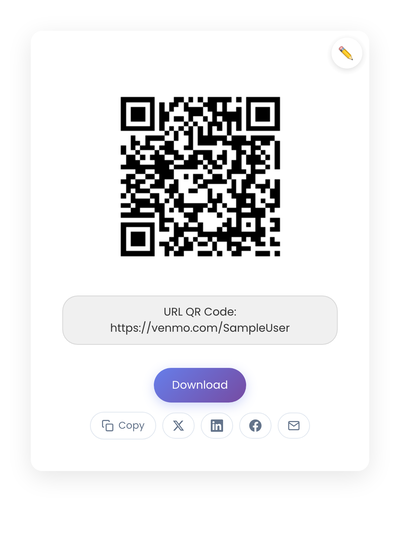
A static QR code from a venmo.com/SampleUser URL. The code holds the link directly; nothing about it depends on a subscription service.
A note on funding source
This is the part most articles skip. The QR code is unaware of how the payer pays you. The payer decides at the moment of payment whether the money comes from their Venmo balance, their bank account, or a linked credit card. They also pick how you receive: instant transfer for a small fee, or free standard transfer in a few days.
If you’re a freelancer or contractor receiving regularly, the choice matters for your reconciliation. Standard transfers batch up and arrive in your bank without fees. Instant transfers cost a small percentage but land in minutes. For client work I lean on Stripe for the longer-cycle invoices and Venmo for the small one-offs, mostly because the fees and timing line up differently with each.
If you’re paying, the funding-source question is the same in reverse. Paying from a credit card via Amex Send (or another linked card) gives you the credit card’s dispute protections at the cost of a small fee on the sender side. Paying from a bank-linked balance is free but slower to recover if something goes sideways.
The QR code is neutral to all of this. It opens the profile. The funding decisions happen after the scan.
Static vs dynamic, for Venmo specifically
For a Venmo QR code, static is the right pick. Your Venmo username doesn’t change often, and you want a code on your truck or your tip jar to work indefinitely without a subscription behind it. Dynamic codes add a redirect, a vendor, and a renewal fee for no real benefit in this use case. The longer comparison lives in our static vs dynamic QR codes article.
Privacy and what scanners actually see
When someone scans your code, they see your Venmo profile. That profile shows transaction history by default unless you’ve adjusted privacy settings. Before printing a code that strangers will scan, review your privacy controls and decide what you’re comfortable showing. Some users keep their full profile public; others lock it down to friends only. Neither is wrong, but it’s worth deciding deliberately before the card goes into a hundred wallets.
Where Venmo codes silently fail
Each of these is invisible until you watch someone try to pay.
A code printed too small to scan reliably. Two inches square is the practical minimum for any sign people scan from a distance; one inch is the floor for a business card.
Low contrast, or a code placed on a busy photo or a glossy background. Phone cameras need clean black-on-white to lock on quickly. Reception is forgiving until it isn’t.
A code without any label. “Scan to pay with Venmo” right next to it removes the moment of hesitation. Without the label, half of casual scans never happen.
Changing your Venmo username after printing. The new URL silently breaks every printed code in circulation, and you don’t find out until a payer mentions it.
And the biggest one: not testing. Scan your own printed code with a phone you don’t own before committing to a print run.
Creating a Venmo QR code
Your Venmo profile URL is venmo.com/YourUsername. Make a code from that URL on StackQR and tuck it into a wallet, a contractor’s toolbox, or a sign by the tip jar. The static code keeps working for as long as the username exists.
A Venmo QR code solves one specific thing: the username step. It removes the back-and-forth of spelling the handle out loud, and that’s the whole job.