“What’s the WiFi password?” is probably the most repeated sentence in any coffee shop, salon, or waiting room on earth. The answer is usually written on a chalkboard in cursive, taped under the counter, or held in the memory of whichever staff member is closest to the door. Each time someone asks, the shift stops for a few seconds. Over a full day that’s nothing. Over a full month of full days, it’s real time, and it’s time spent on a question no one involved actually enjoys.
A WiFi QR code makes the question go away. A guest points a phone camera at the sticker on the table, taps “Join,” and they’re online. Staff keeps making drinks, the guest keeps reading, and the password stays out of the air where it can be overheard.
I notice this most when I travel. The last time I was in Spain and France, hotels often handed me a small printed card at check-in with the WiFi name and password in characters that needed careful transcription. A QR code on the same card would have removed an entire failure mode without changing anything else about the welcome.
A WiFi QR code stores your network name and password so guests can scan and connect automatically, with no typing needed. Generate one from your SSID, password, and security type, print it near your counter or seating area, and you’ll rarely hear “what’s the password?” again. The code works as long as your credentials stay the same.
What a WiFi QR code actually is
A WiFi QR code is a static QR code that stores network connection details in a standardized format: the SSID, the password, and the security type (WPA2, WPA3, or open). When a phone scans the code with its camera, the OS recognizes the format and offers to join the network. No typing. No copying. No asking staff to repeat a password the fourth time.
Virtually every phone released since 2018 handles this natively. The code itself is passive. It doesn’t connect the phone, it doesn’t track the scan, and it doesn’t know who scanned. It hands the credentials to the OS, which prompts the user to confirm.
Think of it like a digital sticky note that phones can read.
Where it earns its place
Anywhere people sit for more than a few minutes. Cafés and coffee shops where guests work or study, restaurants and bars where people check messages between courses, salons and barbershops where clients sit through a service, clinics and waiting rooms where patients spend longer than they expected, offices and coworking spaces with rotating guest networks. The code is most valuable wherever the question would otherwise interrupt staff or hold up an awkward exchange across language differences.
A small sign near the register or seating area is usually enough. Restaurants often pair the WiFi code with a menu QR code on the same table tent for a one-glance welcome.
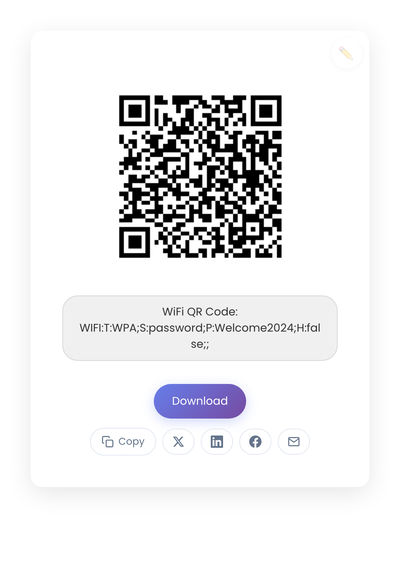
A static QR code generated from a WiFi SSID and password. The code holds the credentials directly; nothing depends on a subscription or third-party service.
Static vs dynamic, for WiFi
For WiFi, static is almost always the right answer. The code holds the credentials directly inside it. There’s no redirect service to depend on, no subscription to renew, no third party that can track scans. If your network details stay the same, the printed code keeps working. If your password changes, you reprint. That predictability is the feature.
A dynamic WiFi QR code routes through a third party, which means the code can break if the service shuts down or your subscription lapses. For something as basic as connecting guests to a network, that tradeoff almost never pencils out. The static vs dynamic comparison walks through the reasoning in more detail.
Privacy and trust
WiFi access touches on trust, even when guests don’t think about it consciously. A few practical choices keep the trust intact.
Always share the guest network, not your internal one. A QR code makes sharing fast, which is great for guests and dangerous if it’s pointed at the wrong network. Make sure the QR code encodes the guest SSID before printing.
Avoid tools that add tracking. A WiFi QR code doesn’t need analytics to do its job. If a generator tracks scans or locations, ask what problem that solves for you. Usually nothing.
Label the code clearly. “Scan to join our WiFi” is enough. No surprises, no clever framing. People scan more when they know exactly what they’re scanning.
Designing and placing the code
The physical rules for QR codes apply here. Dark code on a light background scans most reliably; brand-colored codes look pretty in mockups and fail more often in practice. Size matters: a code on a table tent should be at least 1.5 inches square so it scans from a comfortable lean. The empty space around the code (the quiet zone) is what scanners use to lock on, so don’t crowd it with logos or text.
For placement, think about where the question naturally comes up. The counter, the wall near the seating, the table tent, the front desk. One or two well-placed signs handle most guests. Don’t overload the room.
What stops a WiFi code from working
Most issues come down to four mistakes.
Printing before testing. Always scan the printed result on an iPhone and an Android phone before committing to a print run, since ink density and surface finish change scan behavior.
Changing the WiFi password without updating the code. A static code holds the old credentials, so it stops working the moment you change anything. This isn’t a flaw; it’s how static codes work. Reprint when you rotate the password.
Overbranding. Logos, gradients, and colors in the code make it harder to scan. For WiFi, where guests are sometimes in low light or holding their phone at an angle, reliability matters more than aesthetics.
Using a generator that requires accounts or runs through a third-party service. The code may stop working if the service does, which defeats the purpose of a printed sign meant to last.
Creating a WiFi QR code
The fastest path is the dedicated WiFi QR code generator: a form for the network name, password, and security type, including hidden networks and open networks with no password. If you prefer plain English, the main generator understands wifi GuestNetwork password Welcome2024 and detects the security type automatically. Either way the password stays on your device because the code is generated in the browser, which matters more for WiFi than for most other QR types.
Test on at least two phones before printing. The printed code keeps working as long as the credentials stay the same.
How long they last
A static WiFi QR code lasts as long as the credentials inside it remain accurate. No expiration date. If your network stays the same for five years, the code stays good for five years. If you change the password next month, the code needs reprinting next month. That predictability is what makes the format useful for a physical sign that hangs around for a while.
Whether it’s right for your space
If you don’t offer WiFi, you don’t need a code. If your customers never stop moving, it probably doesn’t matter. But if people sit, wait, or work in your space, a printed WiFi code earns its real estate: one scan replaces the staff conversation that previously happened ten times a day about the password.