I scan QR codes from YouTube videos all the time. We watch mostly on a big screen, and creators often drop a small code in the corner of the video pointing to a lead magnet, a free download, or a sign-up page. From the couch, scanning is the only practical way to follow up. Typing a URL from a TV across the room isn’t going to happen. The QR code is the bridge between the video on the screen and the next action on my phone.
I also run @StackQR, so I think about this from both ends. The question isn’t whether QR codes work for YouTube. They do, in specific contexts. It’s where they work and where they’re decoration.
A QR code for your YouTube channel creates a direct scan-to-subscribe path from business cards, merchandise, and event signage. Use your channel URL (youtube.com/@YourChannel) or add ?sub_confirmation=1 for a subscribe prompt. Static codes work permanently on printed materials with no subscription needed.
How a YouTube QR code actually earns its scan
The fact that your channel URL is already clickable online means the code’s value is almost entirely offline, or on someone else’s screen. The scans that matter happen on business cards at conferences, on stickers at merch tables, on posters at gigs, on banners at craft fairs, on the bottom corner of a YouTube video the viewer is watching on a TV they can’t tap. Anywhere a phone is out but typing a handle into the YouTube app is annoying enough that most people won’t bother.
That’s the whole case for putting a QR code on your channel. It’s not a growth hack, it won’t replace good videos or a consistent upload schedule, and it doesn’t generate subscribers on its own. What it does is remove the one step where interested strangers quietly give up, and it costs nothing to set up.
Pick the right URL for the moment
YouTube hands out a few different URL formats, and which one you encode into the code changes what happens after the scan.
Your channel page (youtube.com/@YourChannelName) is the right pick when the goal is general discovery. A new visitor lands on your channel, sees your recent uploads and pinned content, and decides whether to stay. This is what most business cards and merch should use.
A specific video URL works when you want everyone who scans to start with the same content, usually because that video is your strongest introduction or your most timely release. Useful at events where you’re explicitly handing out cards tied to a topic.
A playlist URL guides scanners into a curated experience. Helpful for tutorial series, themed collections, or onboarding sequences that work best in order.
The subscribe URL, youtube.com/@YourChannelName?sub_confirmation=1, fires the subscribe prompt the moment the scanner lands on YouTube. Use it sparingly. It works well at events where you’ve already earned the scan through a conversation, but it can feel pushy on a sticker someone scanned out of casual curiosity.
Where the scans actually happen
Placement decides everything. The scans that matter for YouTube channels happen at predictable places.
Business cards at networking events get scanned far more reliably than business cards left on a table. The conversation that just happened is the prompt. The QR code is the action.
Merchandise (stickers, posters, packaging inserts) carries the code home with someone who already bought into the brand. They’ll see it again later and may finally subscribe when they have time.
Live event booths benefit most when the code sits on a banner at eye level, where someone passing by can scan even while you’re talking to someone else.
Local flyers and printed promotion still work in specific niches, and the QR code is what saves these from becoming dead text someone has to retype.
A QR code briefly displayed in a video can be scanned directly from the screen. This works for cross-promotion, playlist drops, and time-limited offers. It also covers the on-the-couch scanning pattern I started with.
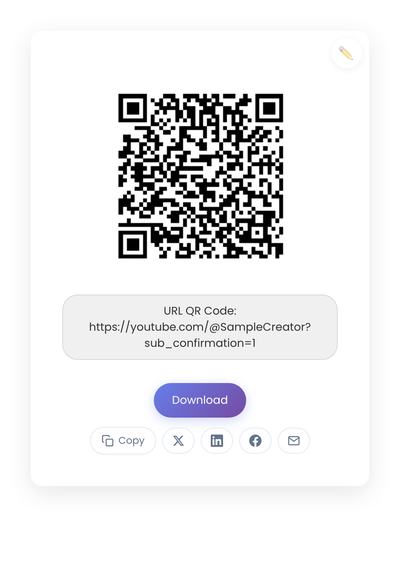
A static QR code pointing to youtube.com/@SampleCreator?sub_confirmation=1. The subscribe prompt fires the moment the scanner lands on YouTube.
Static vs dynamic, for YouTube specifically
For YouTube, static is the right choice almost always. Your channel URL is stable. It doesn’t change when you upload new videos or rebrand. And you want codes on merchandise, on business cards, and in video corners to work for years without subscription dependencies. Dynamic codes add a vendor in the middle and a recurring fee for almost no benefit in this use case. The static vs dynamic comparison covers the decision in full.
Design rules that keep the code scannable
Three rules cover most of it. Size up: business cards need at least half an inch square; posters scale up proportionally; codes on video screens need to take up enough pixels to render cleanly on the smallest screen they’ll appear on. Contrast matters: dark code on light background is the default for a reason, and brand-colored codes look great in a portfolio while scanning worse than plain black. Quiet zone matters: the empty space around the code is what scanners use to lock on, so don’t crowd it with logos or text.
And test the final printed result on at least two phones, in the lighting it’ll actually face, before committing to a print run. The cost of reprinting a stack of business cards because the QR code didn’t scan is bigger than ten minutes of pre-test work.
What stops YouTube QR codes from working
Four problems cause most dead scans.
Using a shortened URL or a tracking redirect that may expire. For printed merchandise, stick to the direct YouTube URL. The code will probably outlive the redirect service.
Changing your channel handle after printing. YouTube sometimes redirects old handles to new ones, but it isn’t guaranteed, and broken codes on circulating merchandise are an awkward problem to discover months later.
Adding a logo or gradient to the code. They look beautiful in mockups and scan less reliably in the real world. For critical uses like packaging or business cards, keep the code clean.
And the biggest one: skipping the printed test. Glossy paper, ink density, and ambient lighting all change scan behavior. Always scan the printed version with a phone that isn’t yours.
Creating a YouTube QR code
Take your channel URL and generate the code on StackQR. If you want the subscribe prompt to fire on scan, add ?sub_confirmation=1 to the end before generating. Download SVG for merch printing or PNG for digital use. The encoding happens in the browser, so the channel URL doesn’t reach a server before becoming the printed code.
For merchandise specifically, test the printed sample under typical use lighting. A glossy sticker on a laptop in fluorescent office light can behave differently than the proof you scanned in your studio.
When the code matters
A QR code is not going to grow your channel. Content does that. What the code does is remove a small barrier between an interested stranger and your channel page, in places where typing isn’t going to happen. Conferences, merch, gig posters, the corner of a video someone is watching on a TV across the room.
For everywhere else, the URL works fine. The QR code is for the specific moments where typing fails.